Features
Parlance is a narrative design environment for the whole story layer of a game — not just dialogue trees. This page tours the major surfaces; the complete feature index lists every capability down to the small stuff, and the editor guide documents each one in depth.
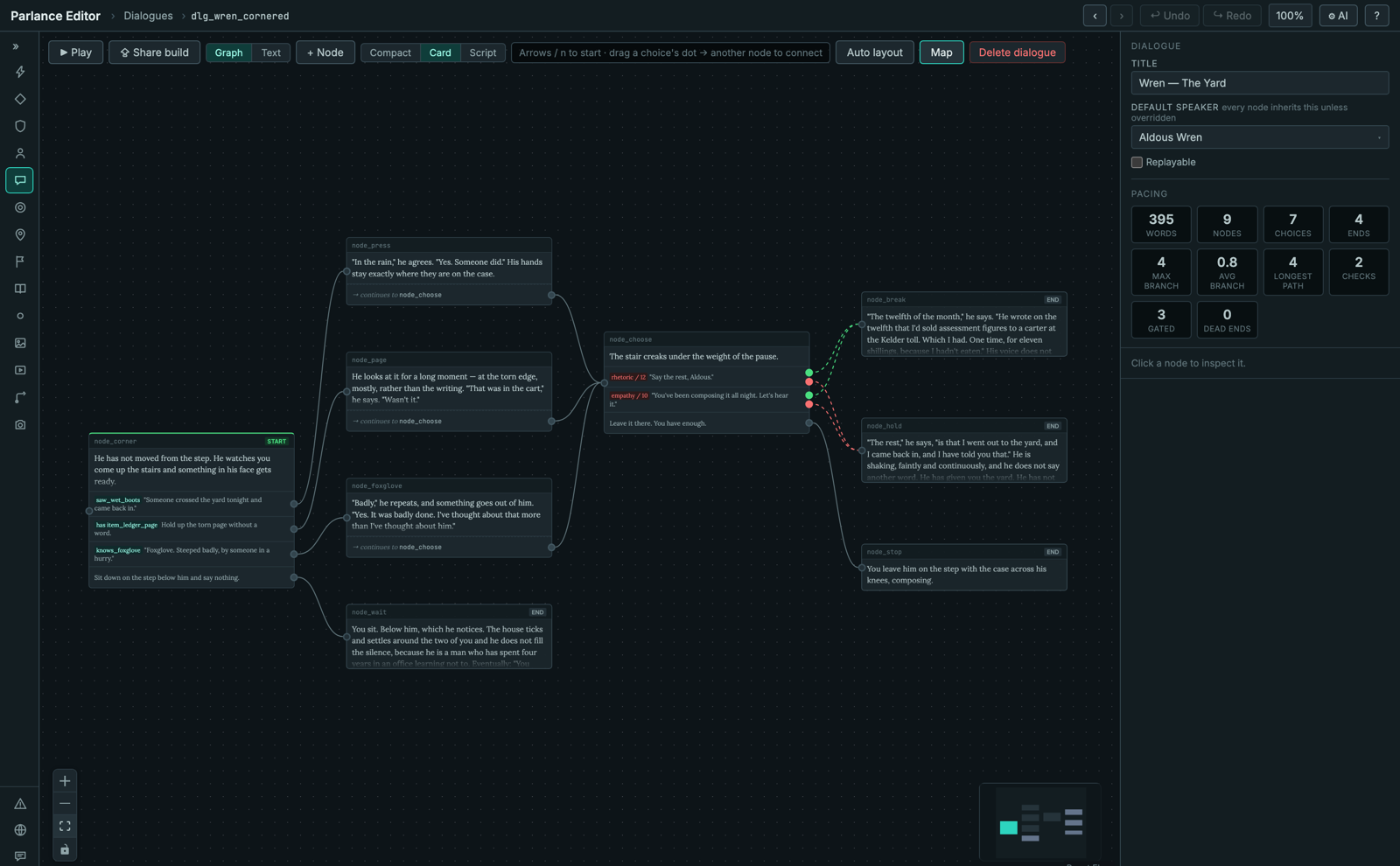
The editor, on the demo mystery's climax scene — every screenshot on this site is the real tool on real data.
The data model: files, not a database
- One JSON file per entity, human-readable, canonically serialized (sorted keys, stable formatting) so git diffs are per-entity and reviewable.
- Twelve built-in entity types: skills, variables, factions, characters, dialogues, quests, locations, endings, codex entries, items, portraits, and cutscene manifests.
- Your own data types — declare entity
types the built-ins don't cover (drinks, suppliers, loot tables) with string, number,
boolean, enum, reference and list fields. Rows are validated like everything else and
edited in a spreadsheet-style grid: inline edit, sort,
column:valuefilters, copy and paste to and from Excel or Sheets, a picker for reference fields, problems marked on each cell, and undo. - Schema-first: 20 JSON Schemas drive both validation and the editor's forms. The same schema that rejects bad data generates the UI for editing good data.
- No export step. The editor writes
data/; your engine readsdata/. That's the whole integration model. - Asset bindings — an optional
data/bindings/file per engine profile maps portraits, VO lines and cutscenes to your engine's asset paths. The reference validator warns on anything used but unbound, or bound but missing.
Dialogue authoring
- Node graph canvas — conversations as a left-to-right flow with visual edges for
choices, skill checks (separate success/failure routes), and choiceless
nextbeats. - Script view — the same scene as editable text, in a compact grammar with a lossless byte-level round-trip, syntax highlighting, find & replace, and id autocomplete. Type or click; your choice per moment.
- Flow map — every dialogue in the project as one graph, with edges for cross-scene routing and cutscene chains.
- Dialogue offers — each dialogue declares when it should play, and the engine picks the most specific eligible one to decide which dialogue plays right now, with a live resolution preview.
- Skill checks — active (
d20 + skill ≥ difficulty, with a probability bar previewing the success chance at any stat) or passive (no roll: a reveal threshold your game applies), optional conditional modifiers, and check badges generated automatically on the canvas. - Conditions & effects builders — structured editors for flags, counters, items, reputation, relationships, quest state, and boolean combinators; no scripting language to learn, and everything they produce is validated.
- Conditional narration — gate a line, not just a choice. A narration node whose condition fails is skipped; on a node with choices, or an end node, only the line is hidden and the choices stay. A beat can belong only to a player who worked something out, without fabricating a decision they never made.
- Fallback and locked choices — a fallback choice appears only when none of the node's other choices is available, so the player isn't stranded. A choice whose condition fails can be shown greyed out with its own locked text ("Requires Persuasion 4") instead of hidden. A node with choices can also have no line of its own.
- Tags and engine commands —
tags on lines and choices pass through to your game untouched, for camera cues, mood
or analytics. An
engineeffect hands a named command to your game at its place in the effect order; declare your commands and the validator checks names and argument counts. - Text variables — let the player name the protagonist;
{placeholder}substitution is render-time only, so authored files stay clean. - Pacing panel — scene size, branch shape, longest path, check density, and dead-end detection at a glance.
Quests, locations, and the rest of the world
- Quest canvas — stages and outcomes as a graph, with journal objectives (intent, in the protagonist's voice) kept distinct from retrospective descriptions.
- Quest dependency graph — the whole quest structure as a DAG: which quest's flags open or close which, with start, gated and closes badges.
- Location map — locations and their exits (including gated ones) as a graph.
- Endings, codex, cutscene manifests — all first-class, all validated, all reachable from the same reference index.
Playtesting
- In-canvas playtest with a live simulated game state: starting-state editor, seeded deterministic dice, rewindable transcript, forced check outcomes, cross-scene continuation, and a live state inspector.
- Edit while playing — change the scene mid-session; state carries over and the session re-reads the content instantly.
- Share builds — export any scene as a single self-contained HTML file that plays in a browser with the same core engine. Hand it to a writer, get feedback, no setup.
- Placeholder voice lines — hear lines
in Play before they're recorded, through your own text-to-speech provider (an
OpenAI-compatible API or a local command). Audio is cached outside
data/and never counts as recorded VO.
Story-logic testing
- Explore —
plays your story for you: seeded random runs, then an exhaustive pass that takes every
choice and both outcomes of every check. It reports unreached nodes and choices and
real dead ends, and says when the search was cut short, so a node is never called
unreachable because the search stopped early.
parlance exploreruns it in CI. - Find a path here — from the node inspector, find a shortest way to reach a node, and keep it as a snapshot or as a route that replays to it.
- Route coverage — which nodes your saved routes touch, and which dialogues no route
touches at all, in the Explore tab, on the flow map, and from
parlance route --coverage. - Route replay — load a saved route in Play and step through it with the canvas following. If a step no longer holds, replay stops there and leaves you in a live session to carry on by hand.
Validation
- Thirty validation families covering references, reachability, flag flow, quest logic, offer resolution, coverage, conditional narration, localization targets, progression math, and more.
- Runs on every save, incrementally (only what the change can affect is re-checked) and off the editor's main thread, streamed live to every open editor window.
- Runs headless in CI via
parlance ci-check, plus an independent Python reference validator kept in enforced parity. - Reports panel — coverage issues grouped and clickable, plus a searchable reference index: for any id, see where it's defined, read, and written ("find usages" for your story). A Speakers tab counts lines, words and voiceable lines (every spoken node line; choice text is never voiceable) per character, for casting and VO budgets.
- A prose check that knows your names — spelling, plus
your own proper nouns derived from your data and matched case-sensitively.
Kestralreports as a near-miss ofKestrel;kestrelreports as a name written lowercase. Runs in the editor, inline as you type, and in CI.
Collaboration
- Git-native review — read a colleague's branch as a narrative diff ("2 nodes added, offer re-gated"), play the branch's own content, comment on story anchors rather than line numbers, propose replacement text the author applies in one click, and record verdicts. Works with nothing but git — no server.
- Localization & VO pipeline — extract every player-facing string with stable keys, hand off locale templates, track coverage per language, and flag stale keys when the entity or line they belong to is renamed or removed. VO maps voiceable lines to engine audio keys the same way.
- Script export — a Word screenplay or an Excel line sheet (speaker, localization and VO keys, condition, check and effects per line) for one dialogue or the whole project, for the people who read the script outside the editor.
- Lore as linked documents —
edit your
lore/Markdown in the editor, with links to entities that show up in find usages and on the entity itself. Reviewers can comment on a lore paragraph, and a thread whose paragraph was later edited is marked rather than left pointing at the wrong text.
Automation & AI
- CLI —
parlance initscaffolds a project,parlance ci-checkgates CI,parlance routeruns scripted playthrough fixtures with assertions,parlance exploreandparlance witnesstest story logic,parlance renamerenames an id, andparlance exportwrites scripts and tables. - MCP server — LLM agents read and write project data, custom rows included, through the same validated path as the editor, with dry-run support and automatic re-validation after every write.
- AI drafting — optional, against Anthropic or OpenAI-compatible providers with your own key: proposes candidate player choices at a node (never NPC lines), each checked against your project before you see it. Candidates are marked in the draft panel until you add one; once added it is an ordinary, unwired choice with no AI marker in the data.
Migrating in, and reviewing what's there
Two optional agent skill bundles in the open SKILL.md format, for any coding agent that loads skills, ship separately from the editor. They are both MIT-licensed and meant to be forked. See integrations.
- Importers for seven formats — Yarn Spinner, ink, Twine (Harlowe and SugarCube), ChoiceScript, Arcweave and Ren'Py. Move a manuscript you already wrote. Every emitted string is checked against the source byte for byte, and anything that can't be carried is named, with its source line, rather than approximated.
- Six editorial audits — read a project and report on it: whether a character's offers resolve to the story you meant, whether a character sounds like themselves, whether a line can be reached in a state where it isn't true yet.
One rule governs both, and it's enforced rather than promised: nothing in either bundle writes prose. The audits report and never draft; the importers convert and never paraphrase. Loss is declared, never silent — a migration with three named losses is a good outcome honestly reported, and one that came out clean because the awkward lines were reworded is a failure wearing a success.
The editor itself
- Command palette (
Cmd/Ctrl+K) — fuzzy-jump to any entity or action from anywhere. - Undo/redo for every save, plus browser-style back/forward selection history.
- Rename an id everywhere — rewrites every reference to an entity's id: other entities, localization and VO keys, bindings, test routes and snapshots, lore links, review threads and canvas layout. You see every file it will change first, and it refuses if anything changed on disk after the preview.
- Node density toggle, minimaps, auto-layout, resizable persistent panels, text scaling, inline lore viewer, inline flag creation — the small features are catalogued in Shortcuts & small features so you don't miss them.
Wondering how it compares to articy:draft, Twine, ink, or Yarn Spinner? See the honest comparison.